 281e9398cc
With swayidle one can configure two different kinds of hooks:

  - Idle timeouts are executed after the session has been idle for a
    specific amount of time.

  - Events are executed when systemd notifies us that for example the
    user session is locked or that the device is about to suspend.

While not obvious, there is a significant difference between how these
two kinds are configured: there can be several timeouts with separate
commands to be executed, but each event can only be specified once. If
an event is specified multiple times, then the last command wins.

This can be very easy to miss in swayidle's documentation. Furthermore,
because the config is a list of `{ event = "..."; command = "..."; }`
attrset, we double down on this confusion and make it seem like having
multiple handlers for an event was actually supported.

Fix this by converting from a list of "event" submodules to an attrset
where the key is the event name and the value is the command to be
executed. This makes it impossible to specify multiple commands for a
single event by accident.

If a user _does_ want to have multiple commands executed on any event
they can for example use `pkgs.writeShellScript` and manually chain the
commands in that script.
|
||
|---|---|---|
| .builds | ||
| .github | ||
| docs | ||
| home-manager | ||
| lib | ||
| modules | ||
| nix-darwin | ||
| nixos | ||
| templates | ||
| tests | ||
| .editorconfig | ||
| .git-blame-ignore-revs | ||
| .gitignore | ||
| .gitlab-ci.yml | ||
| all-maintainers.nix | ||
| buildbot-nix.toml | ||
| default.nix | ||
| flake-module.nix | ||
| flake.lock | ||
| flake.nix | ||
| Justfile | ||
| LICENSE | ||
| MAINTAINING.md | ||
| Makefile | ||
| overlay.nix | ||
| README.md | ||
| release.json | ||
| treefmt.toml | ||
| xgettext | ||
Home Manager using Nix
This project provides a basic system for managing a user environment using the Nix package manager together with the Nix libraries found in Nixpkgs. It allows declarative configuration of user specific (non-global) packages and dotfiles.
Usage
Before attempting to use Home Manager please read the warning below.
For a systematic overview of Home Manager and its available options, please see:
If you would like to contribute to Home Manager, then please have a look at "Contributing" in the manual.
Releases
Home Manager is developed against nixpkgs-unstable branch, which often causes
it to contain tweaks for changes/packages not yet released in stable NixOS.
To avoid breaking users' configurations, Home Manager is released in branches
corresponding to NixOS releases (e.g. release-25.11). These branches get
fixes, but usually not new modules. If you need a module to be backported, then
feel free to open an issue.
Words of warning
Unfortunately, it is quite possible to get difficult to understand errors when working with Home Manager. You should therefore be comfortable using the Nix language and the various tools in the Nix ecosystem.
If you are not very familiar with Nix but still want to use Home Manager then you are strongly encouraged to start with a small and very simple configuration and gradually make it more elaborate as you learn.
In some cases Home Manager cannot detect whether it will overwrite a previous manual configuration. For example, the Gnome Terminal module will write to your dconf store and cannot tell whether a configuration that it is about to be overwritten was from a previous Home Manager generation or from manual configuration.
Home Manager targets NixOS unstable and NixOS version 25.11 (the current stable version), it may or may not work on other Linux distributions and NixOS versions.
Now when your expectations have been built up and you are eager to try all this out you can go ahead and read the rest of this text.
Contact
You can chat with us on IRC in the channel #home-manager on OFTC. There is also a Matrix room, which is bridged to the IRC channel.
Installation
Home Manager can be used in three primary ways:
-
Using the standalone
home-managertool. For platforms other than NixOS and Darwin, this is the only available choice. It is also recommended for people on NixOS or Darwin that want to manage their home directory independently of the system as a whole. See "Standalone installation" in the manual for instructions on how to perform this installation. -
As a module within a NixOS system configuration. This allows the user profiles to be built together with the system when running
nixos-rebuild. See "NixOS module" in the manual for a description of this setup. -
As a module within a nix-darwin system configuration. This allows the user profiles to be built together with the system when running
darwin-rebuild. See "nix-darwin module" in the manual for a description of this setup.
Home Manager provides both the channel-based setup and the flake-based one. See Nix Flakes for a description of the flake-based setup.
Translations
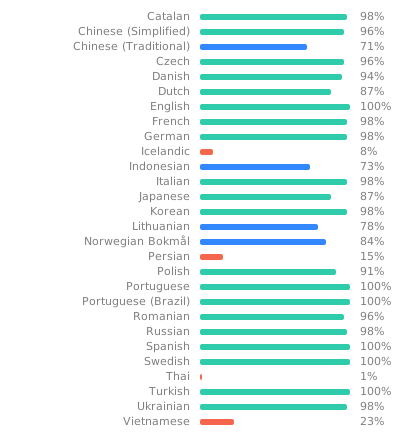
Home Manager has basic support for internationalization through gettext. The translations are hosted by Weblate. If you would like to contribute to the translation effort then start by going to the Home Manager Weblate project.
License
This project is licensed under the terms of the MIT license.