
7.8 KiB

Setup ・ Wiki ・ Gallery ・ Tip Jar
Thanks for dropping by!
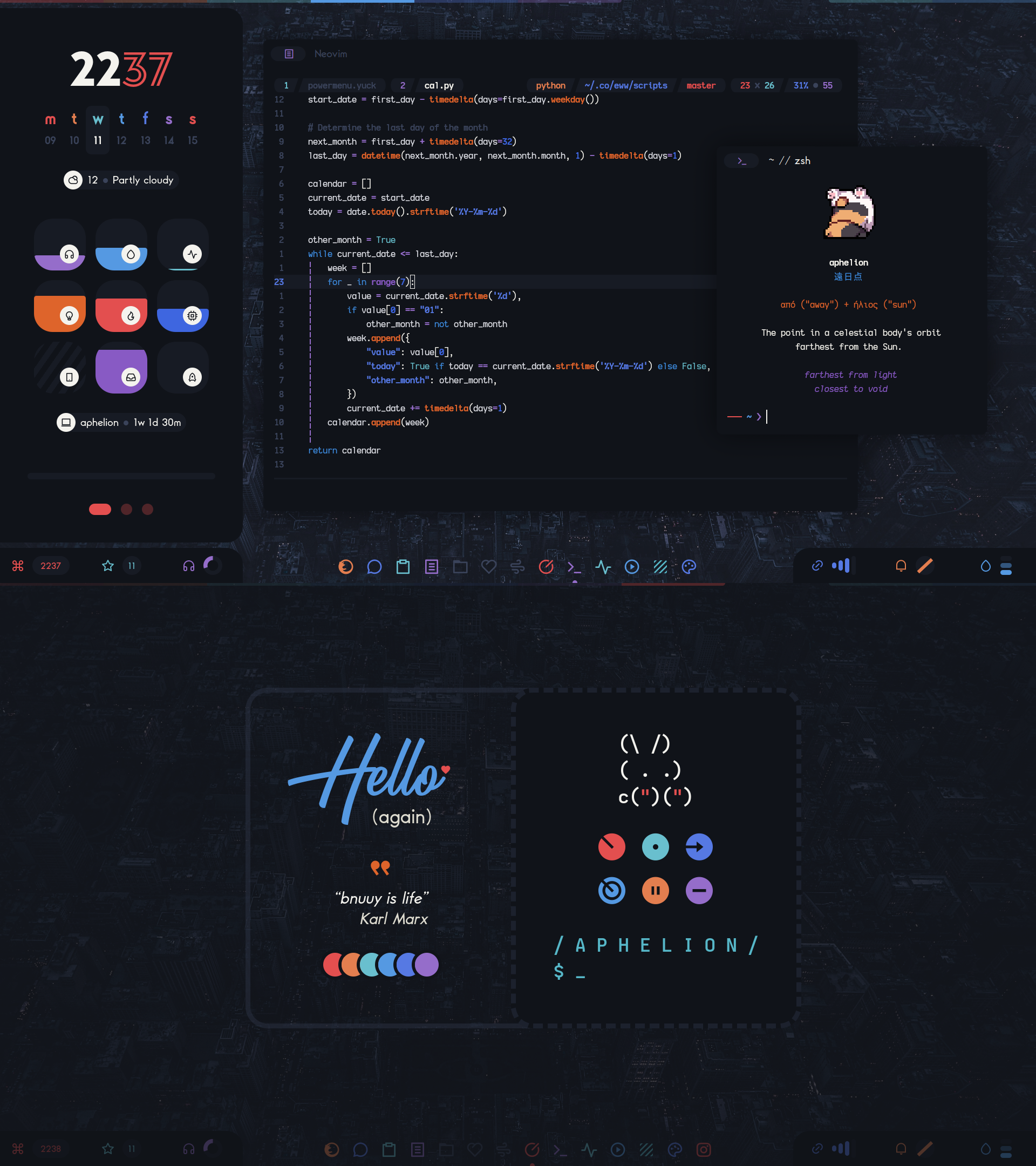
This is my personal collection of configuration files that forms the desktop you see on the right.
Here are some details about my current setup:
- OS: Gentoo
- Window Manager / Compositor: SwayFX
- Widgets: Eww
- Notifications: dunst
- Shell: zsh
- Terminal: kitty
- Editor: Neovim
- File Manager: nnn and Nemo
- Launcher: rofi
- Browser: Firefox
Philosophy
This is not a traditional desktop in any sense. It is highly opinionated, consists of what works for me and looks good for me and frequently disregards traditional desktop conventions and expectations. It has been evolving for about 8 years, spanning across several window managers and a migration from X11 to Wayland.
This desktop is:
- Mouse-friendly but keyboard-loving, particularly when it comes to Vi keys
- Dark and cozy, with vibrant colors and a sprinkle of kawaii-ness
Latest iteration: Aphelion
Features:
- A sidebar widget with 3 pages:
- Clock, date, weather, system info
- Calendar and agenda
- Media info and controls
- Network widget integrated with iwd
- Agenda widget integrated with
.orgfiles - Quick alarm widget
- 2-in-1 powermenu and lockscreen widget
- A simple dock widget, compatible with sway
- Bunny headpats
All interactive widgets can be controlled both with the mouse and the keyboard.
🎬 45 second showcase (YouTube)
Setup
-
Install dependencies
The following packages need to be installed for all desktop functionality to work.
Package Purpose swayfxWindow manager / compositor i3ipcSway-related scripts ewwWidgets bashVarious scripts pythonVarious scripts rofi-waylandLaunchers and menus dunstNotification daemon libnotifyNotification creation with notify-sendnotify-send.shnotify-sendwrapper for notification replacementjqjsonparsing in various scriptsinotify-toolsReaction to file changes in various scripts wgetMaking HTTP requests in various scripts acpidBattery charger state information pulseaudioSound daemon slurpScreen region selection (Wayland) grimScreenshot tool (Wayland) grimshotgrimandslurpwrapperplayerctlMedia info imagemagickMedia art cropping gammastepScreen color temperature tool kdeconnectPhone battery information kittyTerminal emulator iproute2Network events information iwdWireless daemon
Warning
iwd: If you already have a different wireless daemon installed, do not install and enableiwd. Having more than one wireless daemon running at the same time might disconnect your current wireless connection or cause other network issues. Note thatiwdcan be used as a backend for NetworkManager.
Note
Depending on your distribution, the names of the above packages may slightly differ. Also, some of the packages might not be available in your distribution's repositories so you might have to build them from source.
-
Install fonts
The current setup uses the following fonts:
- Baro
- Kyok
- BattleAndy
- My custom build of Iosevka
- Icomoon
- Material Design Icons
To save you time hunting for them online, I have uploaded a .zip file to Dropbox. Download the .zip and then:
# Assuming the .zip was saved in ~/Downloads unzip -d ~/.local/share/fonts ~/Downloads/elenapan-dotfiles-fonts.zip fc-cache -v -
Install dotfiles
Backup first:
mkdir ~/config-backup
cp -r ~/.config/{sway,eww,dunst,fontconfig,kitty} ~/config-backup
Then clone the repo and install the relevant dotfiles:
git clone https://github.com/elenapan/dotfiles cd dotfiles cp -r config/{sway,eww,dunst,fontconfig,kitty} ~/.config -
Tweak the last few settings
-
Set wallpaper:
cp /path/to/your/wallpaper ~/.local/share/wallpaper -
Set location for the weather information widget:
Edit
~/.config/eww/scripts/daemons/weather.shand set thelocationvariable. For example:location="Moscow,Russia" -
Set lockscreen widget password:
Edit
~/.config/eww/globals.yuckand set thescreen-lock-passwordvariable. For example:(defvar screen-lock-password "hunter2") -
Set agenda widget
.orgfiles to watch:Edit
~/.config/eww/scripts/daemons/agenda.shand set theorg_filesvariable. For example:org_files=("$HOME/notes/todo.org" "$HOME/notes/birthdays.org" "$HOME/notes/finance.org")
-
Login
To start the desktop, you may follow the steps in the "Starting" section of the Sway article in the Arch Wiki
Note
SwayFX is essentially Sway with extra features, which means Sway-related and i3-related resources also apply to SwayFX.
Usage
All keybinds are declared in the sway configuration directory in the following files:
-
Global keybinds:
keys -
Widget keybinds:
ewwThese keybinds, implemented using binding modes, are only active when the respective widget is visible.
Contributing
- Bugs: This desktop has only one consistent user (me) and there could be bugs I haven't run into yet. If you have the time to report a bug, please do so in the repository's issues.
- Pull requests: Before starting working on a pull request, open an issue so we can discuss first.
Tip Jar
If you enjoy using this desktop or parts of it and would like to show your appreciation, you may leave a tip here.
It is never required but always appreciated.
Thank you from the bottom of my heart! 💙
- Patreon
- Ethereum: 0x831539d94155C797f786e99f1D061BEc7F11bD38
- Bitcoin: 12j3D4KR94LY7Svvmp3KzGbfGC4YCZkCLe